OHLCV Tab
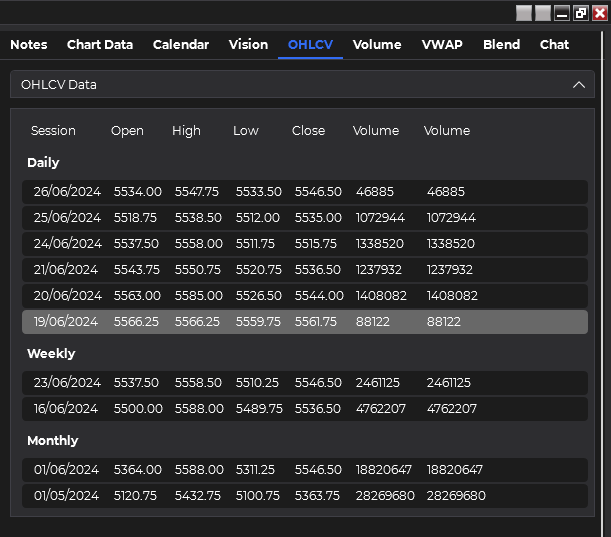
The OHLCV (Open, High, Low, Close, Volume) tab provides a curated, multi-timeframe dataset of essential price and volume information. Similar to the VWAP and Volume Profile tabs, it offers pre-structured data across multiple time horizons.
Key Features
Curated Multi-Timeframe Data
- Daily data for the past week
- Weekly data for the past two weeks
- Monthly data for the past two months
Unlike the Chart Data tab where you can add custom indicators, the OHLCV tab (along with VWAP and Volume Profile tabs) uses pre-curated data. This ensures consistent, multi-timeframe analysis but limits customization options.
Comprehensive Price Information
- Open, High, Low, and Close prices for each timeframe
- Volume data to accompany price information
Using the OHLCV Tab
Review Multi-Timeframe Data
Examine the curated OHLCV data across daily, weekly, and monthly timeframes.
Formulate Prompt
Craft a prompt to analyze specific aspects of the OHLCV data, considering the multi-timeframe context.
Select AI Model
Choose your preferred AI model for analysis.
Initiate Analysis
Click the "Analyze OHLCV Data" button to submit your prompt.
Review AI Response
Read the AI's interpretation and analysis of the OHLCV data across different timeframes.
(Optional) Convert to Speech
Use the text-to-speech feature to listen to the AI's response.
Best Practices
- Leverage Multi-Timeframe Analysis: Utilize the pre-curated data to identify trends and patterns across different time horizons without the need for manual data preparation.
- Compare Timeframes: Ask the AI to compare trends and patterns between daily, weekly, and monthly data.
- Volume Analysis: Pay attention to volume patterns and how they correlate with price movements across different timeframes.
- VWAP Integration: Use the VWAP data to gauge overall price trends and potential support/resistance levels in context of different time periods.
Try prompts that exploit the multi-timeframe nature of the data, such as "Analyze how the daily price volatility in the past week relates to the monthly trend over the past two months."
Integrating OHLCV Analysis with Other Tabs
The OHLCV tab's curated, multi-timeframe data complements other features in the application:
- Use OHLCV insights to inform your chart analysis in the Vision tab
- Combine OHLCV data with economic events from the Calendar tab for a more comprehensive market view
- Cross-reference OHLCV patterns with detailed chart data for deeper analysis
By effectively utilizing the OHLCV tab, you can gain quick insights into price and volume trends across multiple timeframes, providing a solid foundation for your trading decisions without the need for extensive data preparation.
All price values in the OHLCV tab are rounded to the instrument's tick size, following NinjaTrader's standard method. This ensures consistency with the platform's display of price data.